Showing posts with label CSV. Show all posts
Showing posts with label CSV. Show all posts
AWS Glue crawler cannot extract CSV headers properly
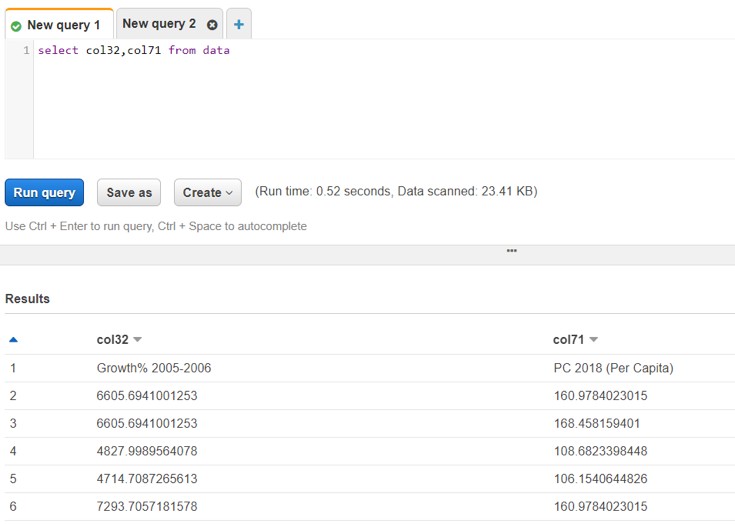
Scenario: You have an UTF-8 encoded CSV stored at S3. You ran a Glue crawler to create a metadata table and further read the table in Athena. When you query the table in Athena, you don't get the headers instead every column is named as (col1, col2, col3,...so on)
Create an AWS Glue crawler to load CSV from S3 into Glue and query via Athena
Let's see how we can load CSV data from S3 into Glue data catalog using Glue crawler and run SQL query on the data in Athena

Steps:

- Go to Glue and create a Glue crawler

- Select Crawler store type as Data stores

- Add a data store
- Choose your S3 bucket folder
- Note: Please don't select the CSV file. Instead, chose the entire directory

- Add another source = No

- Choose IAM role
- Select an esisting IAM role if you have. otherwise, create a new IAM role

- Create a scheduler = Run on demand

- Configure crawler's output
- Select the Glue Catalog's database where you want the metadata table to be created
- This table will only hold the schema not the data

- Now go to the Glue Data Catalog > Databases > Tables
- Here, you will see your new table created that is mapped to the database you specified
- You can also see the database in the Glue Data Catalog
- Now, go to Athena

- Check if you have already configured an output for Athena Queries
- Athena stores each query's metadata in S3 location. so, if path not specified, select a temporary S3 path.
- Select the database in Athena
- You will see your new table created

- Run the sql query to fetch the records from the table created above and see the records
Subscribe to:
Posts (Atom)